Discover 10 practical AI product design principles for creating useful, trustworthy, and human-centered AI apps, agents, copilots, and SaaS products.
AI can generate content, answer questions, recommend actions, predict outcomes, and complete complex tasks. But technical capability alone does not make an AI product useful.
A model may produce an impressive answer while the surrounding product experience remains confusing. Users may not know what to ask, whether the result is reliable, how to correct it, or what will happen when they approve an action.
That is where AI product design becomes essential.
AI product design connects intelligent technology with real human goals. It defines how users communicate with the system, how the system presents its work, and how people stay informed and in control throughout the interaction.
The strongest AI experiences do not ask users to understand the model. They help users complete a task with less effort, better information, and an appropriate level of confidence. The following principles can help founders, designers, developers, and product teams create AI-powered products that feel useful rather than unpredictable.
1. Start With a Real User Problem
The first question should not be: Where can we add AI?
A better question is: What user problem becomes easier to solve because AI is involved?
AI is most valuable when it improves a task that is difficult, repetitive, time-consuming, or dependent on large amounts of information. It should support a meaningful outcome rather than act as a feature added only because users expect to see AI.
For example, a legal AI product might help a lawyer identify relevant clauses across hundreds of documents. A healthcare platform might organize complex patient information for professional review. A customer-support copilot might suggest responses based on account history and approved company policies. In each case, the value comes from improving a specific workflow, not from the presence of a chatbot.
Before designing the interface, define:
- Who the user is
- What they are trying to achieve
- How they complete the task today
- Where the current process breaks down
- What information the AI needs
- What the AI can do reliably
- What must remain under human control
- How success will be evaluated
A clear problem gives the AI feature a reason to exist. Without one, the product may produce interesting outputs without helping users move forward.
Practical design question
Can you explain the value of the AI feature without mentioning the model, algorithm, or technology? When the answer is no, the product may still be focused more on its technical capability than on the user's need.
2. Set Clear Expectations From the Beginning
Users approach AI products with very different expectations. Some assume the system knows everything. Others do not trust it at all. Some expect instant, final answers, while others understand that generated results need review.
The interface should reduce this uncertainty before the first important interaction. Explain what the system can do, what it cannot do, what information it needs, and whether users should review the result before acting on it. Google's People + AI guidance and Microsoft's Human-AI Interaction Guidelines both emphasize helping users understand the system's capabilities at the beginning of the experience.
Good expectation-setting can appear through:
- Onboarding examples
- Suggested use cases
- Sample prompts
- Short capability descriptions
- Clear limitations
- Data and privacy explanations
- Review reminders
- Confirmation steps for important actions
Avoid broad promises such as:
- Ask anything
- Get the perfect answer
- Let AI handle everything
- Receive guaranteed insights
These statements create a mental model the product may not be able to support. Use specific language instead:
- Summarize the selected documents
- Suggest a first draft based on your notes
- Identify unusual patterns for further review
- Recommend products based on your selected preferences
- Prepare a response you can edit before sending
Specific descriptions help users understand both the value and the boundary of the feature.
Example
Instead of:
Our AI analyzes your business and tells you what to do next.
Use:
Review recent sales activity, identify unusual changes, and receive suggested areas for further investigation.
The second version does not make the product feel weaker. It makes the experience more credible.
3. Help Users Provide Better Inputs
Many AI product problems begin before the system generates anything. Users may not know:
- What information to provide
- How detailed their request should be
- Which file format is supported
- What a useful prompt looks like
- Whether the AI remembers earlier context
- Why the previous result was weak
A blank text box transfers too much responsibility to the user. Strong AI input design gives people enough structure to begin without limiting more experienced users. Useful input patterns include:
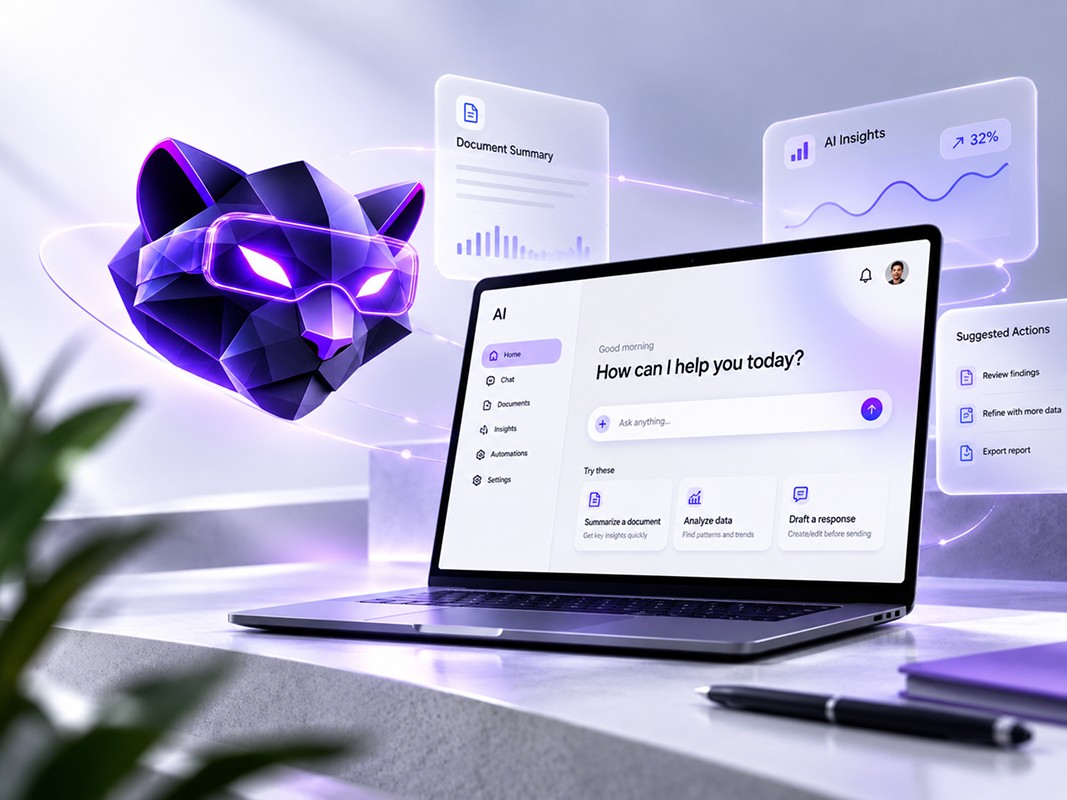
Prompt suggestions
Show common tasks based on the product context. For example:
- Summarize this report
- Compare these two documents
- Rewrite this for a non-technical audience
- Identify the main risks
- Create a follow-up email
Prompt templates
Provide a reusable structure containing fields users can complete. For example:
Create a [type of content] for [audience] with a [tone] tone. Include [key points] and avoid [restrictions].
Structured inputs
Some tasks work better with fields, filters, selectors, and checkboxes than with an open-ended conversation. A recruitment product could ask users to select:
- Role
- Seniority
- Required skills
- Location
- Employment type
- Evaluation criteria
The system can then use those inputs to generate a clearer result.
Examples beside the input
Do not hide every instruction inside documentation. Place useful examples where the user is making the decision.
Context visibility
Show which documents, records, accounts, or data sources the AI is using. Users should not need to guess what information is included in the request. The goal is not to teach everyone how to become a prompt engineer. The product should absorb part of that complexity.
4. Show What the AI Is Doing
AI interactions may take longer than familiar interface actions. The system might be retrieving information, processing files, comparing records, generating media, or coordinating several tools. A generic spinner provides little reassurance. Users need enough information to understand that progress is being made and what stage the task has reached.
Depending on the workflow, the interface might show:
- Uploading files
- Reading selected documents
- Searching approved sources
- Comparing results
- Creating a draft
- Checking the requested format
- Waiting for approval
- Completing the final action
For longer tasks, include:
- A visible progress state
- The ability to leave and return
- Background processing
- A notification when the result is ready
- An option to cancel
- A clear indication of what has already been completed
For AI agents, progress visibility becomes even more important. An agent may plan a task, use external tools, take actions, and encounter exceptions. The user should be able to see what the agent has completed, what it is doing now, and what requires approval. Do not expose unnecessary technical detail. Users usually do not need model logs or internal reasoning. They need a clear operational understanding of the task.
Useful progress message
Reviewing 18 uploaded documents and organizing the findings by topic. This may take a few minutes.
Weak progress message
Thinking...
The first message helps users understand the work. The second leaves them wondering whether the system has stopped.
5. Communicate Uncertainty Honestly
Traditional interfaces are usually deterministic. When a user selects a setting or submits a form, the expected outcome is relatively stable. AI products can behave differently. Two similar requests may produce different answers. A confident-sounding response may contain incomplete or incorrect information. A prediction may represent probability rather than certainty.
The design should help users understand that difference without covering every screen in warnings. Useful approaches include:
- Indicating when content is AI-generated
- Distinguishing facts from suggestions
- Showing supporting sources where available
- Displaying confidence carefully when it has a meaningful basis
- Highlighting missing information
- Explaining why a result could not be produced
- Asking users to review high-impact outputs
- Avoiding language that presents predictions as guaranteed outcomes
NIST's AI Risk Management Framework treats transparency, explainability, accountability, reliability, privacy, fairness, and safety as connected characteristics of trustworthy AI systems. However, adding an "AI may be wrong" notice under every response is not enough. Trust should be supported by the experience itself.
A user evaluating an AI-generated market report may need:
- Source references
- Publication dates
- Clear separation between retrieved information and generated interpretation
- The ability to inspect supporting evidence
- A visible record of manual edits
A user receiving a music recommendation may need far less explanation because the consequences of a poor result are limited. The amount of explanation should match the risk, context, and user decision.
6. Make AI Outputs Easy to Understand
AI products often focus heavily on the input experience while treating the result as a large block of generated text. That is rarely the most useful output format. The result should be shaped around what users need to do next.
A good AI output may use:
- Headings
- Short summaries
- Tables
- Highlighted findings
- Cards
- Comparisons
- Recommended actions
- Editable sections
- Source links
- Confidence indicators
- Filters
- Export options
For example, a financial-risk product should not present every finding inside one long conversational response. It may be more useful to separate:
- Risk category
- Severity
- Supporting evidence
- Affected accounts
- Suggested next step
- Reviewer status
A document-analysis product might organize results by clause, page, risk type, and recommended action. A support copilot might separate the suggested reply from the internal explanation and relevant customer history. The output structure should match the user's decision-making process.
Ask these questions
- What does the user need to notice first?
- Which information is supporting detail?
- What action should follow the result?
- Does the user need to compare alternatives?
- Can the output be edited?
- Does it require approval?
- Should the result become part of another workflow?
- What should happen when no useful result is available?
AI may generate the information, but product design determines whether that information is usable.
7. Keep Users in Control
Human-centered AI should extend people's capabilities without removing appropriate control. IBM describes human-centered AI as an approach intended to augment human abilities while preserving human agency and transparency.
Users should understand:
- What the AI is allowed to do
- What requires approval
- What data it can access
- How to stop or change an action
- How to correct an output
- Whether an action can be reversed
Important controls may include:
- Edit
- Approve
- Reject
- Regenerate
- Compare versions
- Undo
- Pause
- Cancel
- Escalate to a person
- Remove a data source
- Disable automation
The right level of control depends on the consequence of the task. An AI writing assistant may be allowed to generate a paragraph immediately. An AI finance agent should not transfer funds without clear authorization. An AI healthcare product should not conceal when professional review is required.
Avoid false control as well. A button labeled "Improve" is not helpful when users do not know what will change. Prefer specific actions such as:
- Make this shorter
- Use a more formal tone
- Keep the original structure
- Add supporting evidence
- Create three alternatives
- Remove personal information
Control works best when users can predict the effect of an action.
8. Design for Errors and Recovery
Every AI product will eventually produce an unexpected result. The question is not whether the system will fail. The question is whether the user can understand the problem and recover. Microsoft's HAX guidelines explicitly address how AI systems should behave when they are wrong and how they should adapt over time.
Common failure states include:
- Unsupported requests
- Missing context
- Weak or irrelevant outputs
- Incorrect information
- Failed integrations
- Unavailable data
- File-processing errors
- Tool timeouts
- Permission problems
- Safety restrictions
- Contradictory instructions
A good error message should explain:
- What happened
- Why it may have happened
- What the user can do next
Weak message
Something went wrong.
Better message
We could not read two of the uploaded files because they are password protected. Remove the passwords and upload them again, or continue with the remaining documents.
Not every poor result is a technical error. Sometimes the AI completes the task but produces something the user cannot use. Recovery options may include:
- Refine the request
- Add missing information
- Choose a different source
- Regenerate one section
- Restore the previous version
- Compare alternatives
- Send the task for human review
- Report an inaccurate result
Users should not have to restart an entire workflow because one generated section was weak.
9. Create Useful Feedback Loops
Thumbs-up and thumbs-down buttons appear in many AI products, but they often fail to tell users what happens after feedback is submitted. A useful feedback system should serve both the user and the product team.
Feedback can help users:
- Improve the current result
- Explain what was wrong
- Select a preferred alternative
- Correct an assumption
- Personalize future outputs
- Report harmful or inaccurate content
It can help product teams:
- Identify weak use cases
- Find common failure patterns
- Improve prompts and workflows
- Review safety concerns
- Understand where users lose trust
- Decide which features need redesign
Ask for feedback at meaningful moments, not after every small interaction. Instead of relying only on:
- Helpful
- Not helpful
Consider more specific options:
- Incorrect information
- Missing important details
- Difficult to understand
- Not relevant to my request
- Used the wrong source
- Tone does not match
- This action should require approval
When users provide a correction, reflect it in the experience. If nothing visibly changes, users may stop giving feedback. Also make personalization understandable. When the product adapts based on past actions, users should have a way to inspect, update, or reset those preferences.
10. Test the Complete Human–AI Experience
Testing a static screen is not enough for an AI product. Teams need to evaluate how users behave across different outputs, confidence levels, errors, waiting periods, and recovery paths.
AI product testing should include:
- Successful results
- Partially useful results
- Incorrect outputs
- Missing information
- Slow responses
- Failed tool calls
- Conflicting data
- Unavailable sources
- Safety restrictions
- Different levels of user expertise
Observe whether users can:
- Understand the AI's role
- Form an effective request
- Recognize when an answer needs review
- Find supporting evidence
- Edit or reject an output
- Recover from failure
- Complete the larger task
Do not test only with ideal model responses. A polished prototype that always produces the perfect result hides the moments where the real product may lose user trust. During prototyping, create realistic branches such as:
- High-quality result
- Low-confidence result
- No result
- Incorrect result
- Action requiring approval
- Action blocked by permissions
- User changes their mind
- User returns to revise an earlier step
AI UX design needs to account for variation, not only the happy path.
How Is AI Product Design Different From Traditional UX Design?
Traditional UX design and AI product design share the same foundation: understanding users, clarifying goals, designing workflows, testing usability, and improving the experience. The difference is that AI introduces variability.
A traditional product can often define a direct relationship between an input and an output. AI systems may generate different responses, make predictions, adapt over time, or act with partial autonomy. That creates additional design questions:
| Traditional UX Question | Additional AI Product Design Question |
|---|---|
| What happens after the user clicks? | What happens if the AI produces a different result each time? |
| Is the workflow easy to complete? | Does the user understand what the AI is doing? |
| Is the error message clear? | Can the user recover from an incorrect but confident result? |
| Is the content understandable? | Can the user distinguish generated content from verified information? |
| Can the user change a setting? | Can the user correct, override, or stop the AI? |
| Is the interface consistent? | Does the experience remain clear across uncertain outputs? |
AI product design therefore extends beyond interface layout. It includes mental models, trust, control, transparency, feedback, recovery, model behavior, and human oversight.
Common AI Product Design Mistakes
Adding a chatbot to every workflow
Conversation is useful for some tasks, but not all tasks. Data comparison, approvals, monitoring, and repeated operational actions may work better with structured interfaces.
Hiding the limits of the system
Users lose trust faster when the product appears more capable than it really is. Clear boundaries support better decisions.
Treating every output as final
Generated content often needs editing, verification, approval, or comparison. The interface should support that work.
Providing no path after a bad result
"Try again" should not be the only recovery method. Help users change the input, inspect sources, refine a section, or request human support.
Using technical language instead of user language
Users care about completing their work. They usually do not need model names, token counts, embeddings, or internal architecture in the primary interface.
Automating high-impact actions without approval
The more serious the consequence, the more clearly the product should communicate, confirm, and document the action.
Showing confidence without explaining its meaning
A percentage can create false certainty when users do not know how it was calculated or what it represents.
Designing only the ideal response
Real AI outputs vary. Prototypes and usability tests should reflect that variation.
AI Product Design Checklist
Use this checklist when reviewing an AI-powered feature.
Purpose
- Does the AI solve a clearly defined user problem?
- Is AI more useful than a simpler rule-based solution?
- Can users understand the benefit without technical language?
Expectations
- Does the product explain what the AI can and cannot do?
- Are limitations introduced at the right moment?
- Do examples reflect realistic results?
Inputs
- Are users guided toward useful inputs?
- Are templates or structured fields available?
- Can users see which data sources are included?
Outputs
- Is the result organized around the user's next decision?
- Can users verify or inspect supporting information?
- Can they edit, compare, export, or act on the output?
Control
- Can users approve, reject, undo, pause, or correct actions?
- Are important actions confirmed?
- Is human review available where appropriate?
Trust
- Is AI-generated content identified when needed?
- Is uncertainty communicated clearly?
- Does the level of explanation match the risk?
Errors
- Are failure states specific and actionable?
- Can users recover without restarting?
- Have low-quality and unavailable-result states been designed?
Feedback
- Can users explain why an output was poor?
- Does feedback improve the current experience?
- Can users manage learned preferences?
Testing
- Have multiple output qualities been tested?
- Have different user skill levels been included?
- Have edge cases and high-risk actions been reviewed?
Frequently Asked Questions
What is AI product design?
AI product design is the process of turning artificial intelligence capabilities into useful, understandable, and usable product experiences. It covers product strategy, UX research, human–AI interaction, prompts, outputs, user controls, prototyping, usability testing, and developer handoff.
Why is UX important for AI products?
AI functionality can be powerful but unpredictable. UX design helps users understand what the system can do, provide better inputs, interpret results, correct mistakes, and stay in control of important actions.
What are the main principles of AI product design?
Important principles include solving a real user problem, setting accurate expectations, improving inputs, explaining system status, communicating uncertainty, organizing outputs, preserving user control, designing recovery paths, collecting useful feedback, and testing variable results.
How do you design an AI product users can trust?
Trust comes from clear capabilities, realistic limitations, useful explanations, visible sources where appropriate, editable outputs, human approval, feedback controls, and reliable recovery when the AI is wrong.
Should every AI product use a chatbot?
No. Chat works well for open-ended questions and flexible exploration, but structured workflows may work better for comparison, configuration, monitoring, approvals, and repeated tasks. The interface should match the user's job.
What is human–AI interaction design?
Human–AI interaction design defines how people communicate with an AI system, understand its behavior, review its outputs, provide feedback, correct errors, and share control over decisions and actions.
How do you prototype an AI product?
An AI product prototype should simulate realistic prompts, system states, outputs, errors, approvals, loading behavior, and recovery paths. It should include both successful and imperfect results so the complete experience can be tested before development.
Can Endpoint Clients design and develop AI products?
Yes. Endpoint Clients provides AI product design and AI and machine-learning development support. The engagement can include product strategy, UX research, interface design, prototyping, development, integrations, testing, deployment, and post-launch improvement.
Build AI Products With Endpoint Clients
If you are planning an AI-powered feature or product, Endpoint Clients can help translate these principles into a working interface. We provide AI product design services, UI/UX design services, SaaS and dashboard design, MVP design services, and AI and machine-learning development. You can also explore our product work to see how these principles come together in real products.
Final Thoughts
The best AI products do not make users admire the technology. They help users complete meaningful work with less confusion and greater control. That requires more than a prompt box and a generated answer.
A complete AI experience should help people understand the system, communicate what they need, evaluate what they receive, correct mistakes, and decide what happens next.
As AI products become more capable, product design becomes more important, not less. Greater capability introduces more possible outcomes, more user expectations, and more responsibility for the team shaping the experience.
Start with the user problem. Define the role of the AI. Design the full workflow. Prepare for uncertainty. Keep meaningful decisions visible and controllable. That is how an AI feature becomes a product people can rely on.